
When a form's submissions start going somewhere new, such as a dashboard, a Slack channel or a CRM, two privacy questions follow. Did the person agree to their details being collected, and could anything be collected that should never leave the page?
This article explains how the WidgetJar Detected Form widget answers both for forms you already run. It adds a consent checkbox at the point of capture, records when consent was given, and refuses to collect passwords and payment details at all. The example is a sample trial sign-up form, because sign-up forms are where sensitive fields tend to sit right next to ordinary ones.
This is a description of how the widget behaves, not legal advice. What your policy must say, and which consent you need, depends on where you and your visitors are.
What the visitor sees
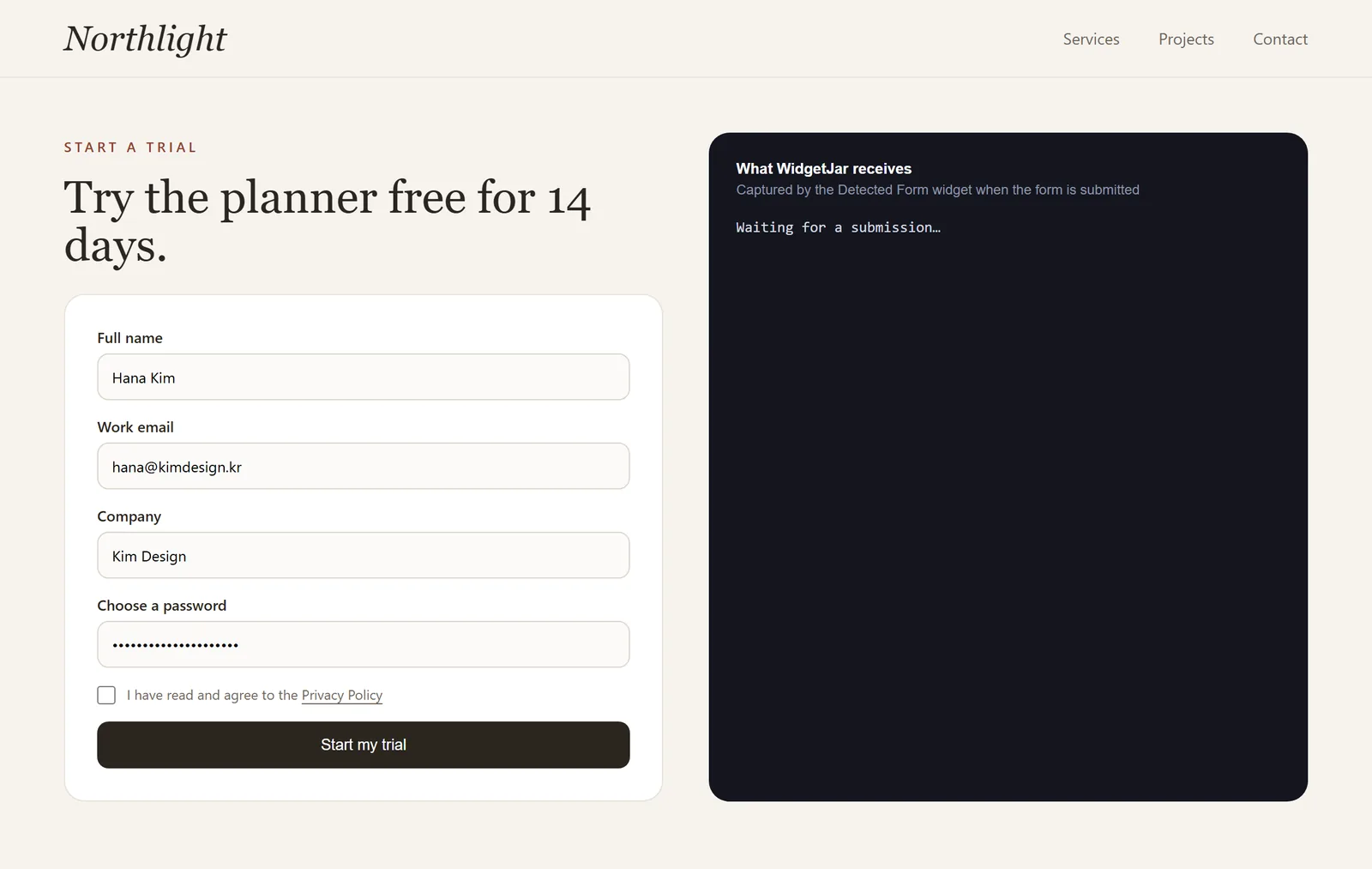
When the widget connects to a form, it adds one control: an unchecked checkbox with the text "I have read and agree to the Privacy Policy", placed just before the submit button. "Privacy Policy" links to the URL you set and opens in a new tab.
Three details are intentional:
- It starts unchecked. Consent has to be an action the visitor takes, not a default they fail to notice.
- It is required. If the visitor submits without ticking it, the browser asks them to, and the widget captures nothing.
- It follows your form's colors. The checkbox and its link use the surrounding text color, so they look like part of the form your visitors already know.
You can change the wording with Consent text and the link with Privacy Policy URL in the builder.
What is recorded with each submission
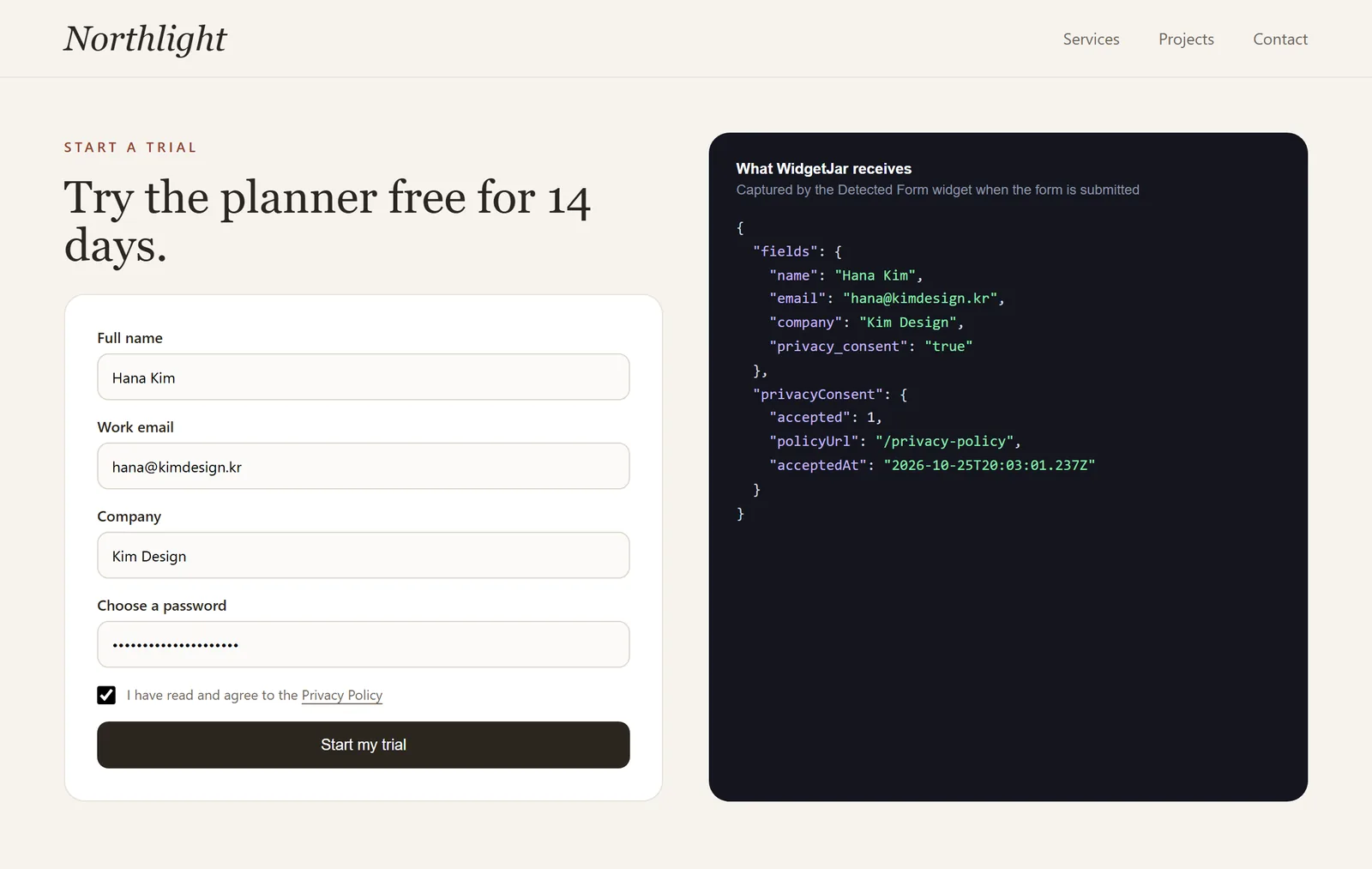
Every captured submission carries a small consent record next to the form fields:
- that consent was accepted,
- the privacy policy URL the checkbox linked to at that moment,
- and the time the visitor gave it.
That record travels with the submission into your dashboard and connected tools. If someone later asks when and how they agreed, the answer is attached to their own entry, rather than reconstructed from a changelog.
What is never collected
Look at the captured data in the screenshot again: name, email and company are there, the password is not. Certain fields are skipped before anything is captured, and no setting can switch that off:
| Skipped automatically | How the widget recognises it |
|---|---|
| Passwords | Inputs of type password, or with current-password or new-password autocomplete |
| One-time codes | Inputs with one-time-code autocomplete |
| Payment card details | Inputs with any cc- autocomplete value, such as cc-number or cc-csc |
| Fields named like secrets | A name or id containing password, passcode, card number, card security code, CVV or CVC |
Hidden inputs are also excluded by default, which keeps tracking tokens and spam traps out of your submissions. Uploaded files are never captured either; for a file input, only the file name is recorded.
Narrow the rest yourself
Automatic rules cover the obvious cases. Your form may still contain fields you do not want in a shared tool, such as a "How did you hear about us?" free-text box that tends to collect personal stories, or an internal reference number. Two settings handle that:
- Excluded field names removes listed fields from every submission.
- Included field names captures only the listed fields and ignores the rest. This is the stricter option, and a good default for long forms where you only need contact details.
Collecting less is the simplest privacy measure there is. If a field is not needed to reply to the person, leave it out of the capture even if the form still shows it.
A short review before you publish
- Privacy Policy URL points to the current policy, and that policy explains what happens to form submissions.
- The Consent text matches the language of the page.
- Submitting without ticking the box is blocked, and nothing appears in the dashboard.
- A test submission shows the consent record with the right policy URL.
- Password, payment and hidden fields are absent from the captured data.
- Any field you would not want in Slack or a spreadsheet is in Excluded field names, or left out of Included field names.
For the field labels and error messages around the checkbox, HTML Form Labels: Write Clear Fields for Lead Forms and Contact Form Error Messages That Help Visitors Fix and Resubmit cover the wording. To forward consented submissions to your team, see Send Existing Contact Form Submissions to Slack Without Rebuilding the Form.
Where WidgetJar fits
The Detected Form widget connects the forms you already run to WidgetJar. It adds the consent checkbox, records consent with each submission, skips sensitive fields, and forwards what remains to your dashboard and connected tools, without changing how your form looks or where it already sends its data.